💬 Welcome Message
The Welcome Message feature allows you to automatically greet new members when they join your Telegram community. This helps create a welcoming atmosphere and provides important information to newcomers.
Overview
When enabled, the Fren One bot will automatically send a customized welcome message whenever a new member joins your chat. This message can include:
- Custom text and formatting
- Community rules and guidelines
- Links to important resources
- Mentions of the new member
- Interactive buttons for quick actions
Configuration
To set up welcome messages:
- Use the
/settingscommand in your chat - Navigate to 👋 Onboarding → 💬 Welcome Message
- Toggle the feature 🟢 Enabled to enable welcome messages
- Customize your welcome message content
Message Customization
- Go to 💭 Message
- Type the Welcome Message in the Telegram chat.
You can customize your welcome message with:
- Plain text: Simple welcome text
- Markdown formatting: Bold, italic, code formatting
- Media: You can drop any Telegram-supported media type to your welcome message. These could be images, videos or gifs.
- Variables Use one or multiple variables in the welcome message:
{user_mention}- mention link for the user.
{first_name}- user's first name.
{last_name}- user's last name.
{full_name}- user's full name.
{username}- username (if available).
{user_id}- user's ID.
{group_mention}- mention link for this group.
{group_link}- link for this group.
{group_name}- group title.
{group_username}- group username (if available).
{group_id}- group ID.
Example Welcome Message
Welcome to {group_name}, {username}! 👋
Please read our community guidelines and don't hesitate to ask questions.
Enjoy your stay! 🎉
Advanced Options
Buttons
- New Button: Add buttons to the welcome message. Send the new button in the following format:
Label | URL
Example:
Website | https://fren.one
Mode
- Direct Message: The welcome message will be sent to the user in direct message (only recommended with CAPTCHA completion via direct message).
- Main chat: The welcome message will be sent to the user in the main chat.
Deletion Mode
- After a set amount of time: The welcome message is deleted after the amount of time entered (in seconds).
- On next user join: The welcome message is deleted upon sending a new one.
- Do not delete: The welcome message is not deleted.
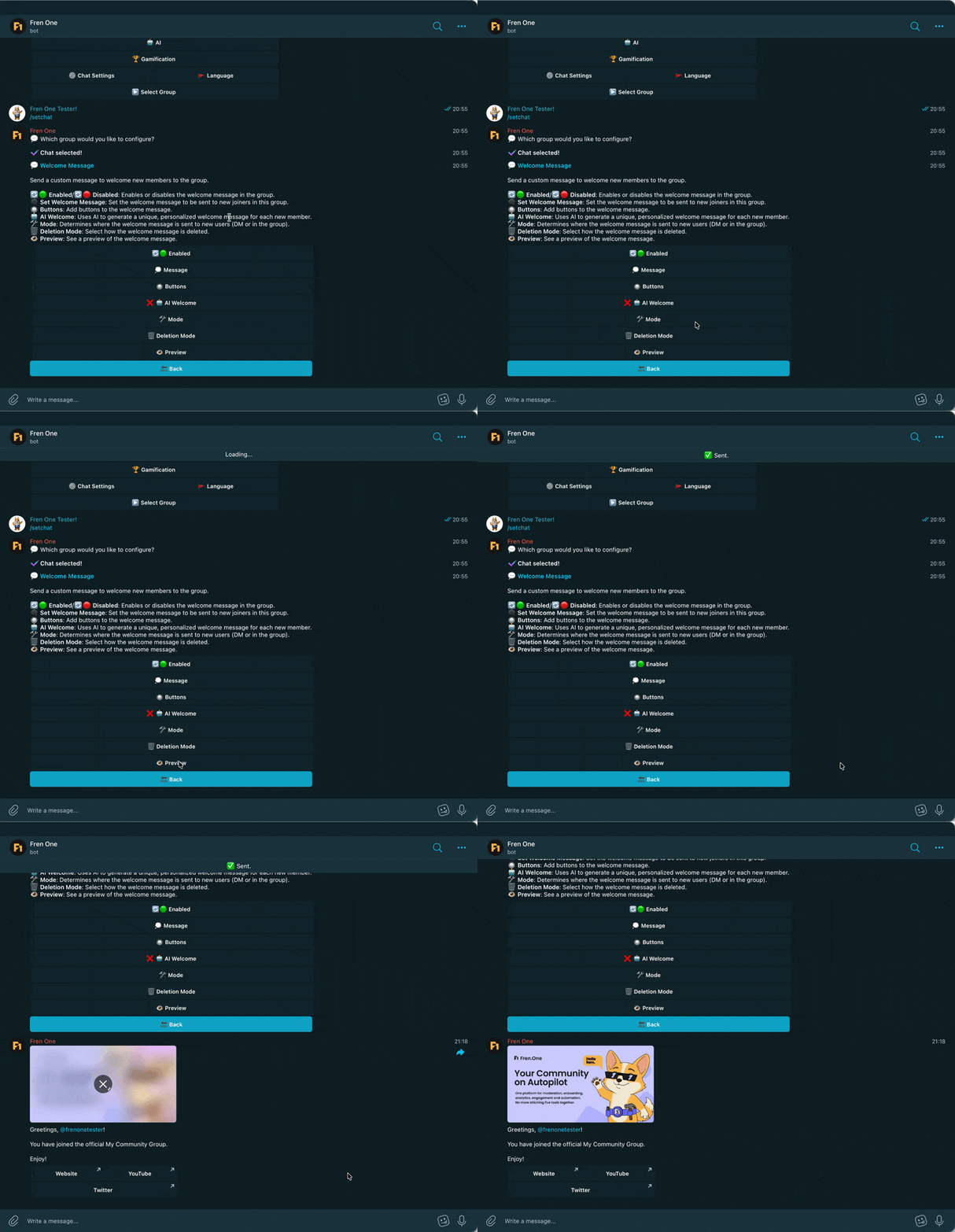
Preview
You can preview your created Welcome Message via the Preview Button
Best Practices
Effective Welcome Messages
- Keep messages concise but informative
- Include essential community rules
- Add links to important channels or resources
- Use a friendly, welcoming tone
- Consider your community's language and culture
Avoid Spam
- Don't make welcome messages too long
- Avoid excessive formatting or emojis
- Consider auto-deletion for busy chats
Troubleshooting
Welcome messages not appearing?
- Ensure the bot has admin privileges
- Check that the feature is toggled 🟢 Enabled
- Verify the bot can send messages in the chat
Formatting not working?
- Use standard Telegram markdown formatting
- Test your message template before deploying
- Check for typos in custom variables
Related Features
- 🧩 Captcha - Verify new members before welcoming
- 👤 User Blacklist - Prevent unwanted users from joining